
Google's automated headlines and descriptions win plenty of clicks, but too often from curious browsers, not customers. In a recent audit, Google's copy cost $235 per conversion. Copy we wrote with AI + a human editor averaged $73, and the best headline came in at $20. Here's the evidence, why automated copy chases clicks, and how to switch it off properly.
If you run Google Ads, Google is quietly writing some of your headlines and descriptions for you. We hope you're keeping them. Honestly. It makes the rest of us look great.
Because on one account we audited, Google's own copy was the single biggest waste in the whole budget: $235 a conversion. The headlines we wrote with AI and a human editor? As low as $20.
We've switched Google's copy off. Here's why, and how.
The numbers tell the story
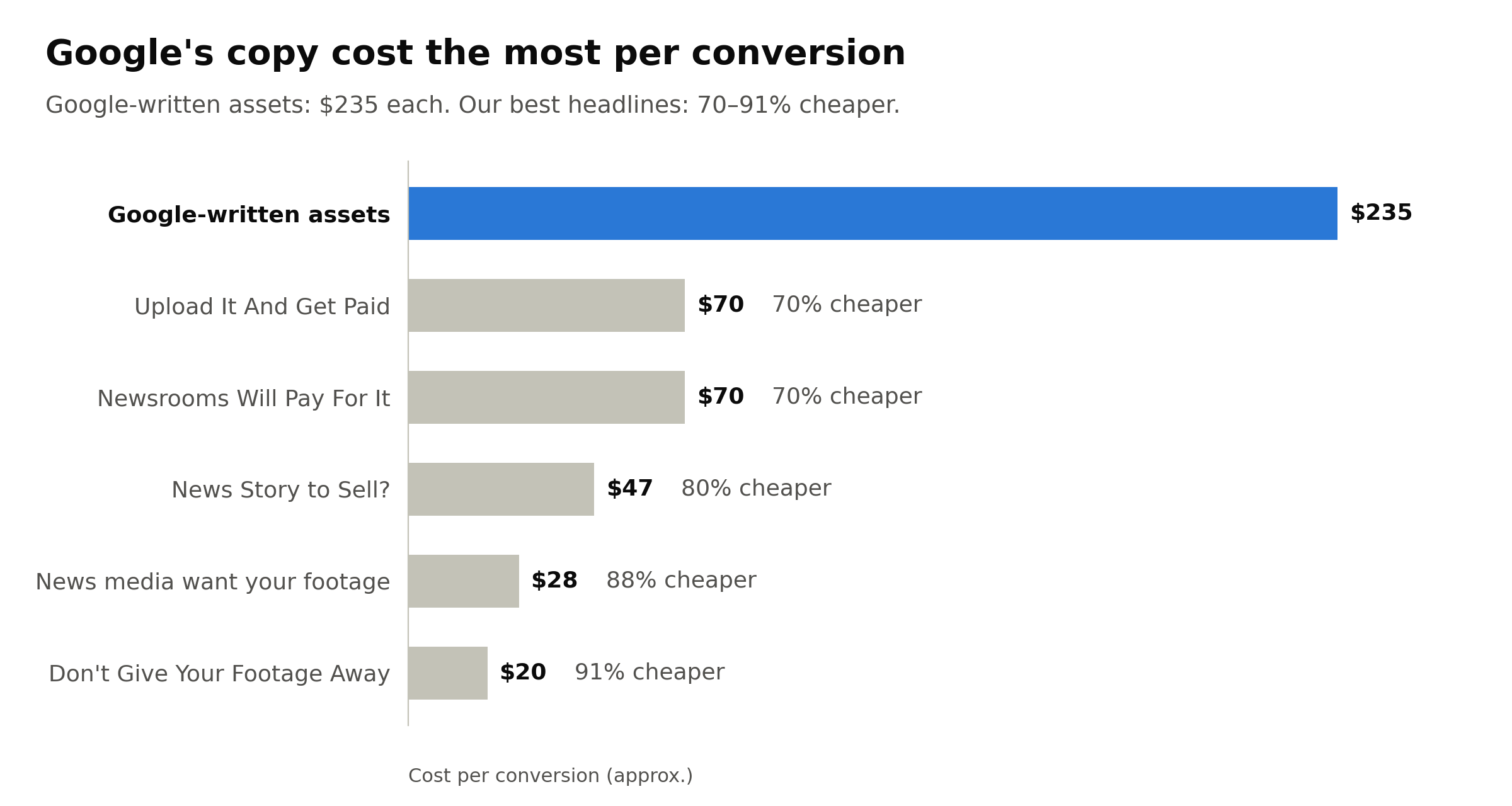
Every headline we wrote beat Google's copy. Not by a little.
What actually worked:
One idea, said five ways
Every top-performing headline makes the same point. Don't give your footage away. Newsrooms will pay for it.
"Don't Give Your Footage Away." "News media want your footage." "News Story to Sell?" "Newsrooms Will Pay For It." "Upload It And Get Paid."
None of them is clever. Each one talks to the person holding the phone, names what they're worried about, and tells them what's in it for them. The last two carried the most volume and still cost less than a third of Google's copy per conversion.
How we got there: AI drafted dozens of options, then a person picked the one idea that mattered and sharpened it.
Great at clicks. Terrible at customers.
Here's the trap. Google's copy looks brilliant in the dashboard: 7–18% click-through rates, well above what most search ads get.
But Google writes for the click, not the customer. Its copy is broad enough to catch everyone, so it does. Curious people click, find it isn't quite what they wanted, and leave. You pay for every one of them.
A high click-through rate on copy that doesn't convert isn't a win. It's a faster way to spend money.
How to switch it off (order matters)
Turn off text customisation first. It's in your campaign settings. Skip this and Google simply writes replacements for the ones you delete.
Then remove Google's assets. Filter your assets by source to find the automatically created headlines and descriptions, and remove them.
Back your best line. Find the one idea that converts for you, and use AI to draft variations, then have a person cut them down to the five that say it best.
Do it the other way round and you'll be playing whack-a-mole with an algorithm. It has more patience than you.
Still using Google's copy?
Go on then. We'll keep ours.
Or, if you'd rather know where your own budget is leaking, talk to Unfold. We find the leaks that cost the most and fix those first.